Trolley Depo
The Trolley Depo page provides an overview of all trolley rails installed in the machine and allows service technicians to monitor their status and change their operating modes.
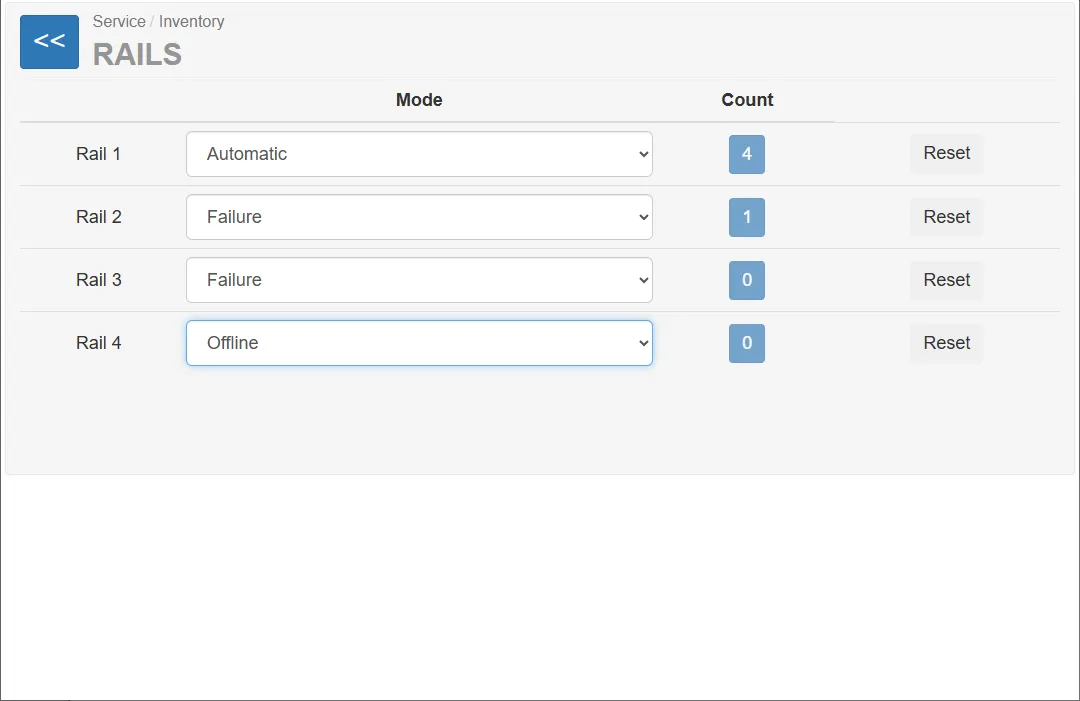
A vending unit can contain up to four rails for storing and dispensing trolleys.
For each rail the page displays:
- the rail identifier
- the current operating mode
- the number of trolleys currently detected on the rail
- a button to reset the trolley counter
Rail List
Section titled “Rail List”The page displays a table containing all rails installed in the machine.
Each row corresponds to a specific rail (1–4).
Operating Modes
Section titled “Operating Modes”Each rail can operate in different modes.
The operating mode can be changed using the dropdown selector.
Automatic
Section titled “Automatic”This is the normal operating mode of the system.
In this mode the rail:
- automatically locks and releases trolleys
- communicates with the vending unit controller
- tracks trolley insertion and removal
This mode should be used during normal operation.
Offline
Section titled “Offline”In Offline mode the rail operates independently from the main system.
A rail may switch to this mode:
- automatically due to incorrect operation
- manually by a technician through this interface
This mode is typically used for diagnostics or when the rail cannot communicate with the system.
Failure
Section titled “Failure”The Error mode indicates that the rail has detected a malfunction.
This mode may be triggered:
- automatically when a hardware or communication error occurs
- manually by a technician for diagnostic purposes
When the rail is in this mode, normal operation is suspended.
Service Input
Section titled “Service Input”This mode is used for service insertion of trolleys.
It allows technicians to place trolleys into the rail without triggering normal customer workflows.
Typical use cases include:
- refilling the trolley depot
- maintenance operations
- testing trolley detection
Service Output
Section titled “Service Output”This mode is used for service removal of trolleys.
Technicians can remove trolleys from the rail for:
- maintenance
- testing
- inventory adjustment
This mode bypasses the normal customer interaction.
Trolley Counter
Section titled “Trolley Counter”Each rail displays a trolley counter that indicates how many trolleys are currently detected on that rail.
The counter is updated automatically when:
- a trolley is inserted
- a trolley is removed
Resetting the Counter
Section titled “Resetting the Counter”Each rail has a Reset button.
Pressing this button:
- resets the trolley counter for the selected rail
- sets the counter value to 0
This function is typically used after:
- manual adjustments of the trolley depot
- service operations
- correcting incorrect counter values