Money
The Money section displays the current financial inventory of the machine and provides an overview of all payment-related subsystems.
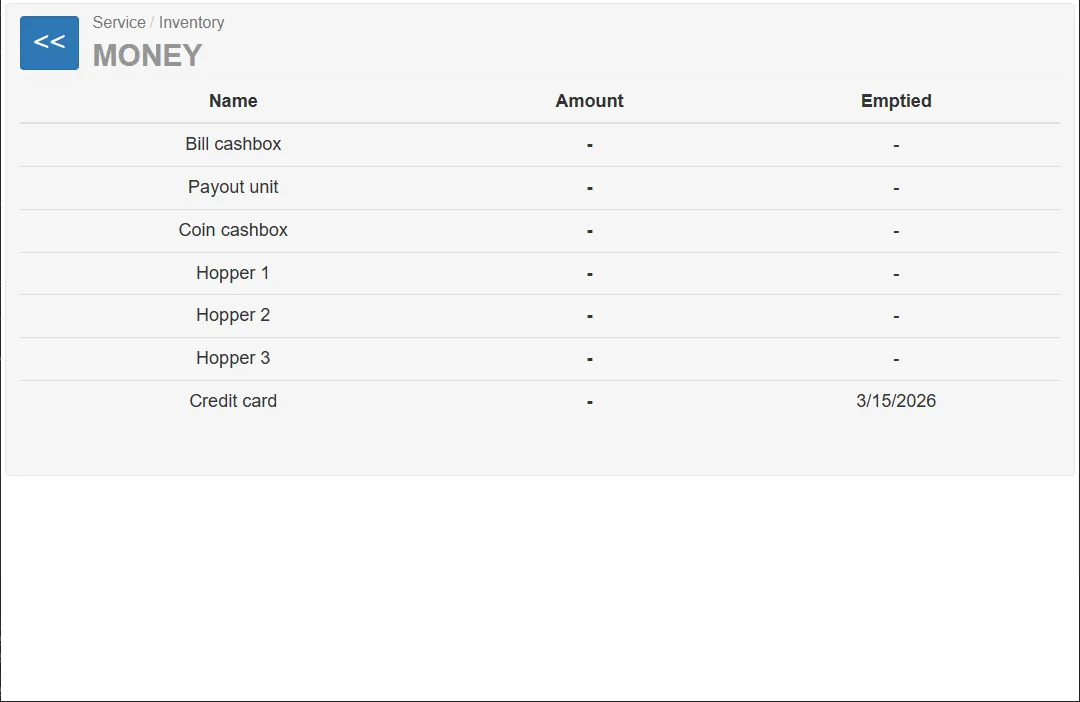
The information is shown in a table with the following columns:
| Column | Description |
|---|---|
| Name | Payment component |
| Amount | Current amount or balance |
| Emptied | Date when the component was last cleared |
This page allows service personnel to quickly review the financial state of the machine.
Table Entries
Section titled “Table Entries”The table may include several payment components depending on the hardware configuration of the machine.
Possible entries include:
| Component | Description |
|---|---|
| Bill cashbox | Storage for accepted banknotes |
| Payout unit | Coin payout unit |
| Coin cashbox | Coin collection box |
| Hopper 1–3 | Coin hoppers used for automatic payout |
| Credit card | Balance from card payments |
Relevant Entry in the Current System
Section titled “Relevant Entry in the Current System”In the current vending machine configuration only one entry is relevant.
Credit card
Section titled “Credit card”The Credit card row displays the accumulated value of payments made using bank cards.
Important note:
The system does not differentiate between credit cards and debit cards.
All bank card payments are recorded in this row.
At the end of the shift, the cash register is reset to zero.
Non-Relevant Entries in the Current Configuration
Section titled “Non-Relevant Entries in the Current Configuration”Other rows in the table are part of the general software interface but are not used in the current machine configuration.
These include:
- Bill cashbox
- Payout unit
- Coin cashbox
- Hopper 1–3
These components would only be active if the machine included:
- a banknote validator
- coin acceptor hardware
- coin payout hopper units
Since the current vending unit operates without these devices, the corresponding fields remain unused.