System / Min-Max Configuration
The Min-Max Configuration page displays a diagnostic table that compares the minimum required, currently detected, and maximum allowed number of hardware devices installed in the vending machine.
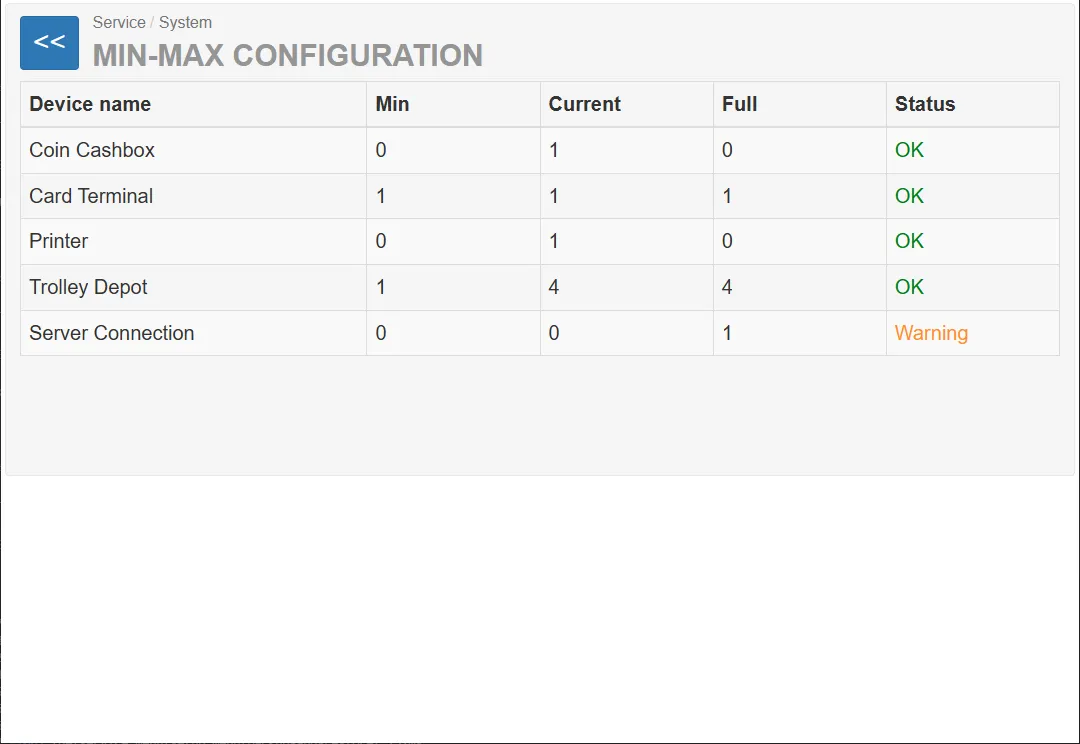
This page is used by service technicians to quickly verify whether the installed hardware configuration matches the expected system configuration.
Configuration Table
Section titled “Configuration Table”The main element of the page is a configuration validation table.
The table compares the expected device configuration with the currently detected hardware.
Table Columns
Section titled “Table Columns”| Column | Description |
|---|---|
| Device Name | Name of the hardware component |
| Min | Minimum number of devices required for system operation |
| Current | Number of devices currently detected by the system |
| Full | Maximum number of supported devices |
| Status | Validation result of the configuration |
Example Configuration
Section titled “Example Configuration”| Device Name | Min | Current | Max | Status |
|---|---|---|---|---|
| Coin Box | 0 | 1 | 0 | OK |
| Card Terminal | 1 | 1 | 1 | OK |
| Printer | 0 | 1 | 0 | OK |
| Trolley Depot | 1 | 4 | 4 | OK |
| Server Connection | 0 | 0 | 1 | Warning |
Device Descriptions
Section titled “Device Descriptions”Coin Box
Section titled “Coin Box”Represents the cash collection box used by the coin acceptor.
Min: 0 Current: 1 Full: 0 Status: OK
Meaning:
- the machine can operate without a coin box
- one device is currently detected
- configuration is valid
Card Terminal
Section titled “Card Terminal”Represents the payment card terminal used for electronic payments.
Min: 1 Current: 1 Full: 1 Status: OK
Meaning:
- the machine requires exactly one card terminal
- the detected configuration matches the expected configuration
Printer
Section titled “Printer”Represents the receipt printer installed in the machine.
Min: 0 Current: 1 Full: 0 Status: OK
Meaning:
- a printer is optional
- one printer is currently installed
Trolley Depot
Section titled “Trolley Depot”Represents the trolley storage system (rails) inside the machine.
Min: 1 Current: 4 Full: 4 Status: OK
Meaning:
- at least one trolley rail is required
- four rails are currently installed
- configuration matches the maximum supported capacity
Server Connection
Section titled “Server Connection”Represents the connection to the backend server system.
Min: 0 Current: 0 Full: 1 Status: Warning
Meaning:
- server connection is optional
- currently no connection is detected
- the system reports a warning
Status Indicators
Section titled “Status Indicators”The configuration of the device matches the allowed range.
Meaning:
- the number of detected devices is valid
- no action is required
Warning
Section titled “Warning”The configuration differs from the recommended configuration.
Failure
Section titled “Failure”Non-functional configuration