Server Connection Settings
The Server Connection Settings page is used to configure the communication parameters between the vending unit and the central server system.
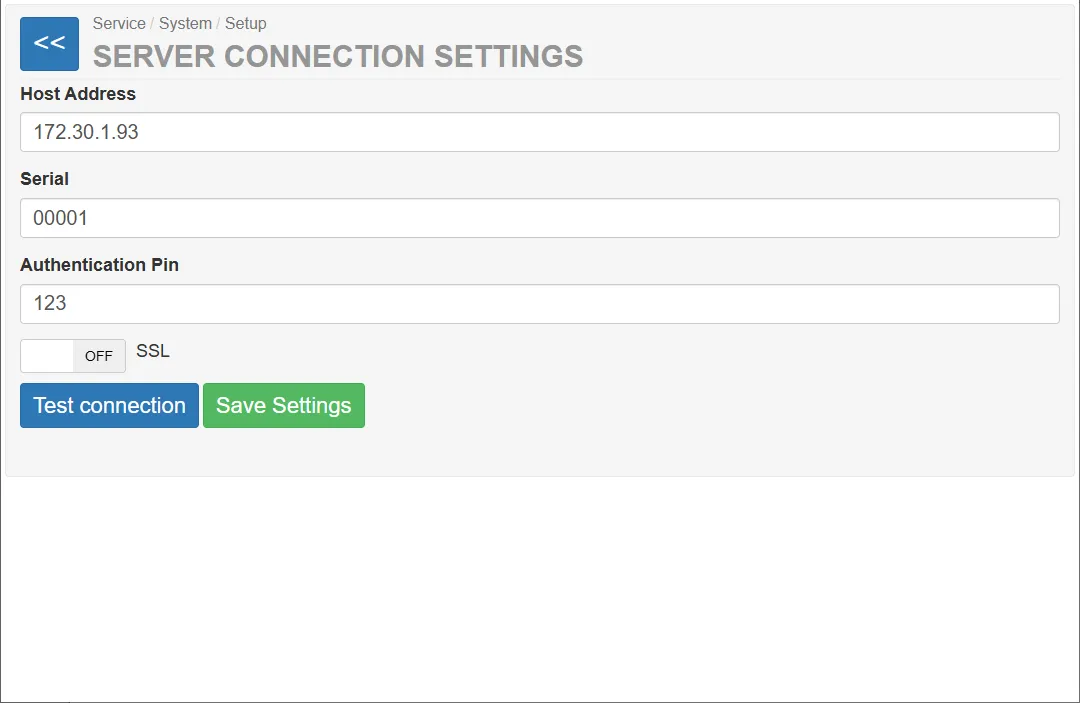
Through this interface, service technicians can:
- define the server address
- configure the machine identification
- set authentication credentials
- enable or disable secure communication
- test the server connection
These settings allow the vending unit to exchange operational data with the backend system.
Configuration Fields
Section titled “Configuration Fields”The page contains several configuration fields that define how the machine connects to the server.
| Field | Description |
|---|---|
| Host address | IP address or hostname of the backend server |
| Serial number | Unique serial number of the vending unit |
| Authentication PIN | Authentication PIN used when communicating with the server |
| SSL | Enables secure encrypted communication |
Host Address
Section titled “Host Address”The Host address field defines the network address of the backend server.
This value may contain:
- an IP address
- a domain name
Serial Number
Section titled “Serial Number”The Serial number field identifies the vending unit in the backend system.
Each vending unit must have a unique serial number so the server can correctly identify the machine.
Authentication PIN
Section titled “Authentication PIN”The Authentifizierungs-Pin is used to authenticate the vending unit when it communicates with the server.
SSL (Secure Connection)
Section titled “SSL (Secure Connection)”The SSL switch enables encrypted communication between the vending unit and the server.
When enabled:
- data transmission is encrypted
- communication security is increased
When disabled:
- communication occurs without encryption
Testing the Connection
Section titled “Testing the Connection”The Test Connection button tests the current connection settings.
When pressed, the system attempts to:
- connect to the specified server
- authenticate using the configured credentials
- verify that communication is possible
This function helps technicians confirm that the configuration is correct.
Saving Settings
Section titled “Saving Settings”The Save Settings button stores the configured parameters in the system.
After saving:
- the new settings become active
- the vending unit will use these parameters for future server communication