Output Test
The Outputs Test page allows service technicians to manually activate and deactivate various hardware outputs installed in the vending machine.
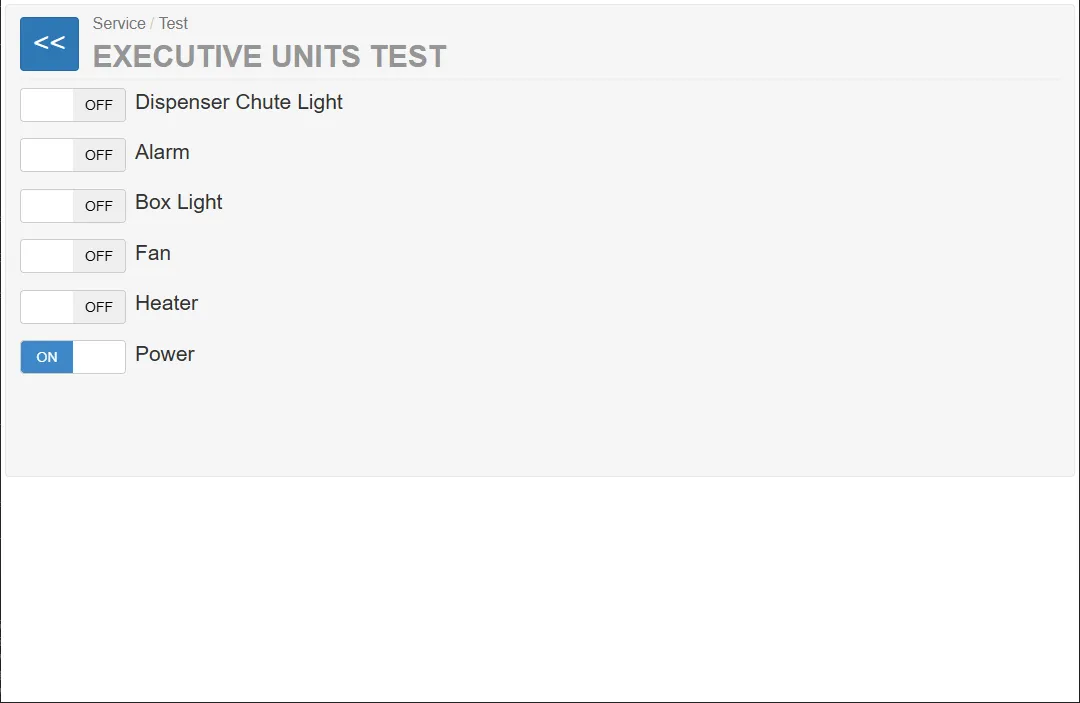
These outputs control physical devices such as:
- alarm systems
- cooling or ventilation systems
- heating systems
- lighting
- power supply components
The purpose of this page is to verify that connected devices and actuators respond correctly to control signals from the system.
This function is commonly used during:
- installation
- maintenance
- troubleshooting
- hardware diagnostics
Output Control
Section titled “Output Control”Each device is controlled using a toggle switch with two states:
OFF / ON
Meaning:
- OFF – the output signal is disabled
- ON – the output signal is activated
When the output is activated, the corresponding physical device should respond immediately.
Available Devices in the Current System
Section titled “Available Devices in the Current System”In the current system configuration, only the following hardware outputs are installed and relevant:
- Alarm
- Fan
- Heater
These devices can be used to verify that the environmental control and security subsystems operate correctly.
This output activates the machine’s alarm system.
Purpose:
- verifies that the alarm signal can be triggered
- checks the functionality of the acoustic warning system
Typical use during testing:
- activate the alarm
- confirm that the audible alarm is functioning
This output controls the ventilation fan installed in the machine.
Purpose:
- verifies the cooling and ventilation system
- ensures the fan motor operates correctly
Typical test procedure:
- Activate the output.
- Verify that the fan starts running.
- Deactivate the output to stop the fan.
Heater
Section titled “Heater”This output activates the heating system of the machine.
Purpose:
- ensures proper operation of the internal heating system
- prevents freezing or condensation inside the machine
Typical test procedure:
- enable the output
- verify that the heater activates
Non-Installed Devices
Section titled “Non-Installed Devices”The interface may display additional outputs that are not present in the current system configuration.
Examples shown in the interface:
- Dispenser Chute Light
- Box Light
These devices are not installed in the current system.
Therefore:
- their signals are not relevant
- switching them has no effect on the hardware.