System / Configuration Parameters
The Configuration Parameters page allows service technicians to configure and control various behavioral settings of the vending machine.
These parameters influence:
- payment behavior
- card terminal operation
- enclosure and security functions
- trolley rail behavior
The page contains several tabs, each grouping parameters related to a specific subsystem.
Only the Server connected configuration mode is used in the current system.
The Standalone Rails and Standalone Turnstile tabs are not used and are therefore not described in this documentation.
Configuration Mode
Section titled “Configuration Mode”At the top of the page, the following configuration mode is selected:
Server connected
Section titled “Server connected”This mode indicates that the vending machine operates connected to a backend server.
In this configuration:
- transactions are managed by the backend system
- machine configuration may be synchronized with the server
- operational logic may depend on server responses
Parameter Tabs
Section titled “Parameter Tabs”Within this configuration mode, parameters are organized into several tabs:
- Payment
- Card Terminal
- Chassis
- Rails
Payment Tab
Section titled “Payment Tab”The Payment tab contains parameters controlling how the machine processes payments and receipts.
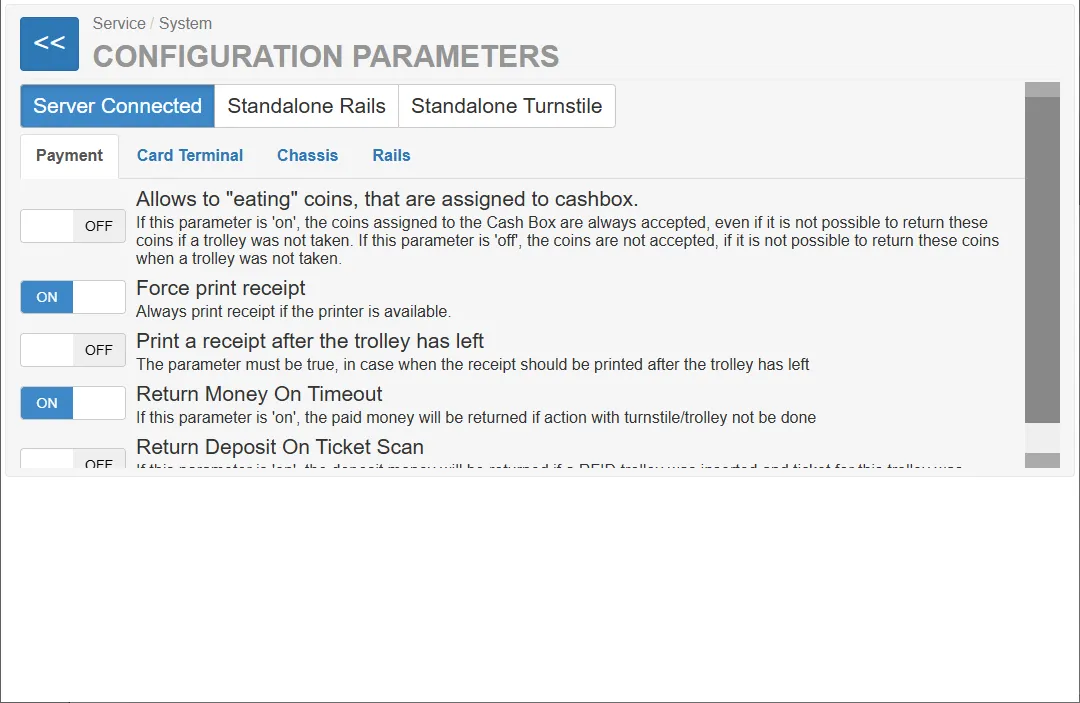
Allows to “eating” coins assigned to the cashbox - NOT USED in the current system
Section titled “Allows to “eating” coins assigned to the cashbox - NOT USED in the current system”OFF / ON
Description:
Allows the system to keep coins assigned to the cashbox even when the trolley is not taken.
Explanation:
If this parameter is ON:
- coins inserted and assigned to the cashbox are always accepted
- even if the trolley cannot be taken afterwards
If this parameter is OFF:
- coins are not accepted if it would not be possible to return them when a trolley is not removed
This prevents situations where the machine keeps coins without providing a trolley.
Force print receipt
Section titled “Force print receipt”ON / OFF
Description:
Forces the machine to always print a receipt when a printer is available.
When enabled:
- a receipt is automatically printed after a successful transaction
Print receipt after the trolley has left
Section titled “Print receipt after the trolley has left”ON / OFF
Description:
Controls whether the receipt is printed only after the trolley has been taken from the machine.
Explanation:
When enabled:
- the receipt is printed after the trolley leaves the machine
- ensures that the transaction is completed before printing
Return Money On Timeout - NOT USED in the current system
Section titled “Return Money On Timeout - NOT USED in the current system”ON / OFF
Description:
Returns the inserted money if the transaction is not completed within a defined time.
When enabled:
- the machine automatically refunds the inserted amount after a timeout.
Return Deposit On Ticket Scan (Only for RFID carts)
Section titled “Return Deposit On Ticket Scan (Only for RFID carts)”ON / OFF
Description:
Returns the deposit if an RFID cart has been inserted and the ticket has been scanned.
Card Terminal Tab
Section titled “Card Terminal Tab”The Card Terminal tab controls parameters related to credit card payments.
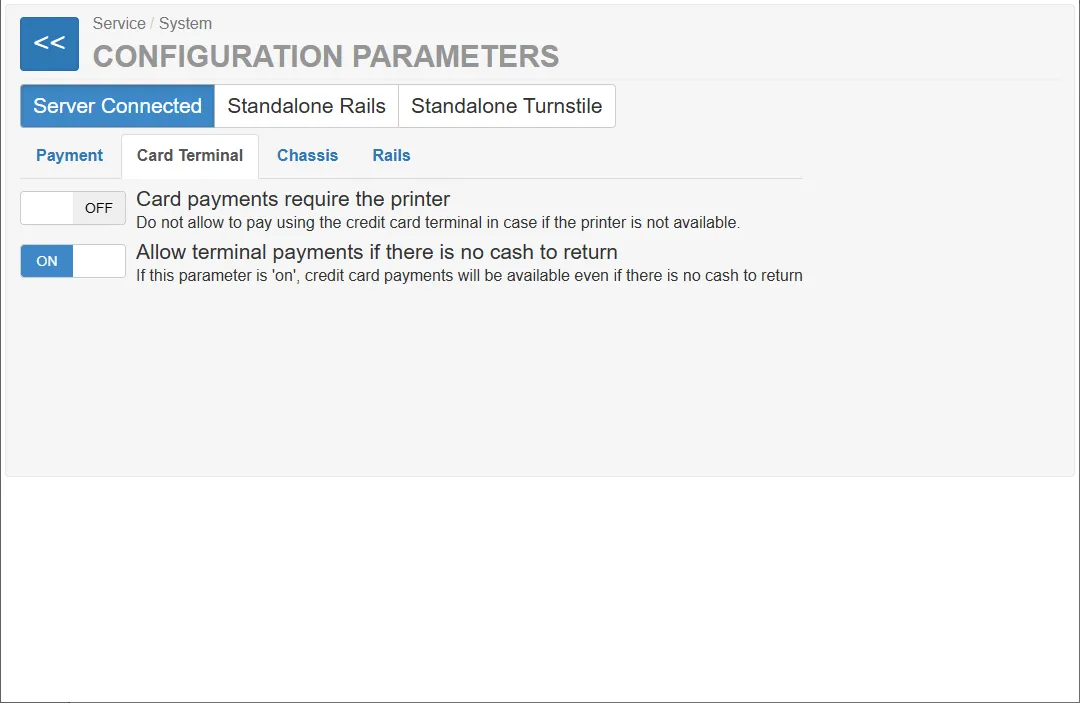
Card payments require a printer
Section titled “Card payments require a printer”ON / OFF
Description:
Prevents credit card payments if the printer is not available.
Explanation:
If enabled:
- card payments are only allowed when the printer is operational
- this ensures that a receipt can always be printed.
Allow terminal payments when no cash is available
Section titled “Allow terminal payments when no cash is available”ON / OFF
Description:
Allows card payments even when no cash payment option is available.
Explanation:
When enabled:
- users can pay by credit card even if the machine has no coins available for change.
Chassis Tab
Section titled “Chassis Tab”The Chassis tab contains parameters related to the vending machine enclosure and security system.
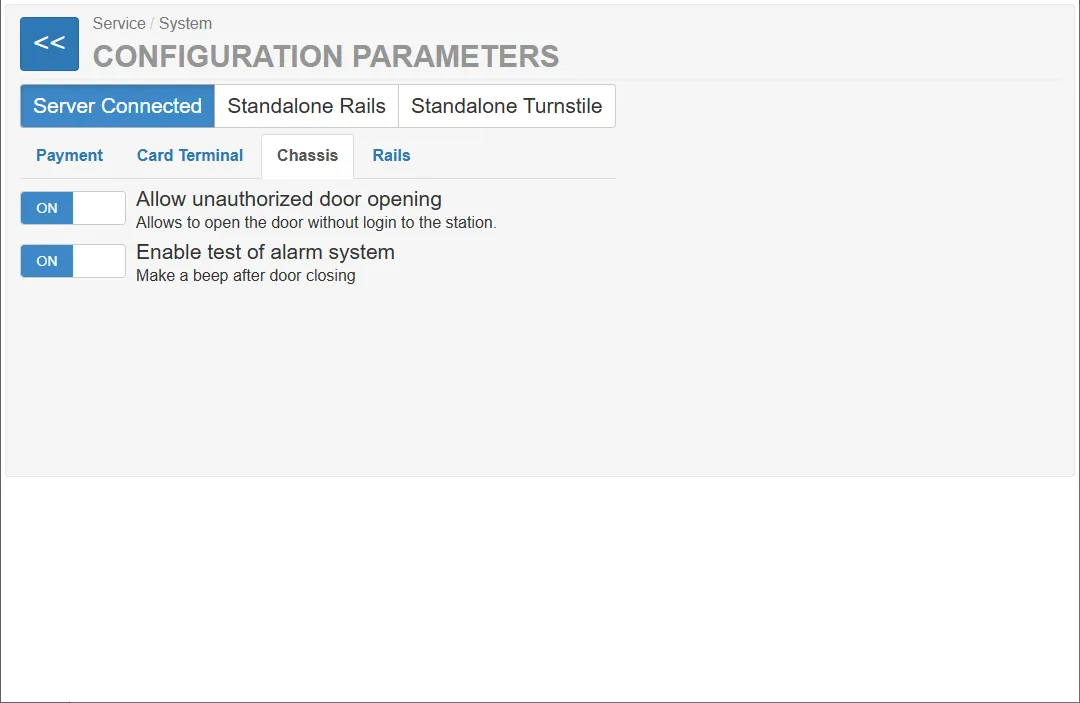
Allow unauthorized door opening
Section titled “Allow unauthorized door opening”ON / OFF
Description:
Allows the machine door to be opened without logging into the station.
When enabled:
- service access to the machine is possible without authentication.
Activate alarm system test
Section titled “Activate alarm system test”ON / OFF
Description:
Activates a test function for the machine’s alarm system.
Behavior:
- after closing the door, the machine emits a beep sound
- confirms that the alarm system is functioning correctly.
Rails Tab
Section titled “Rails Tab”The Rails tab contains parameters related to trolley rail hardware.
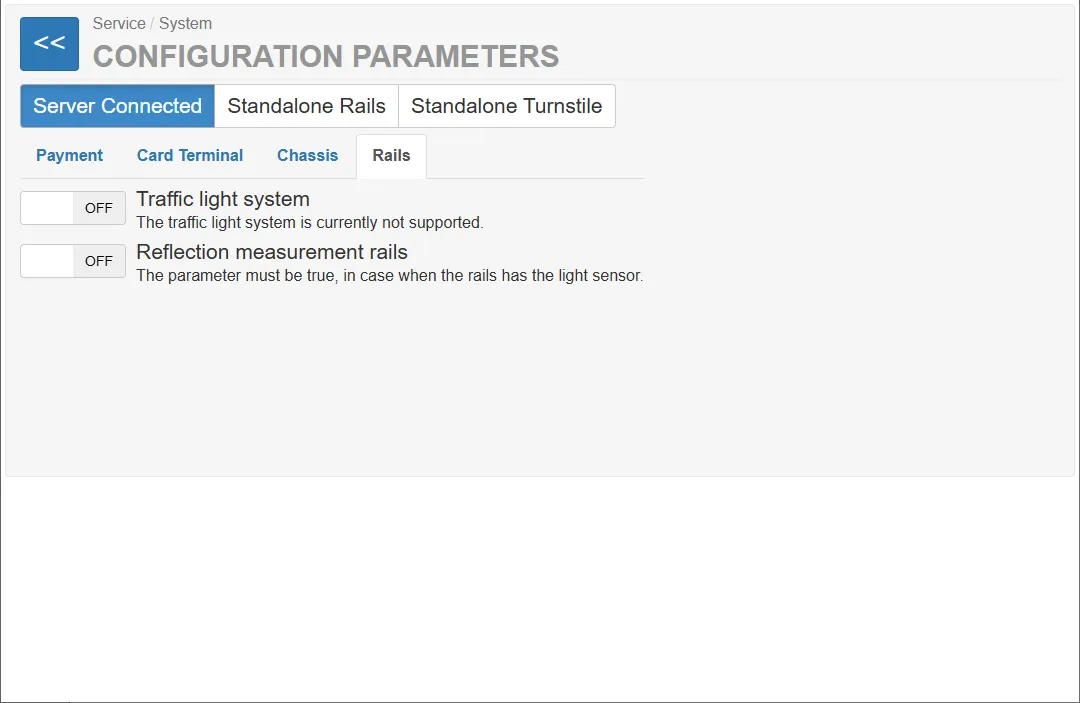
Traffic light system
Section titled “Traffic light system”ON / OFF
Description:
Controls the traffic light indicator system of the machine.
Note:
The current system does not support this feature.
Rail reflection measurement
Section titled “Rail reflection measurement”ON / OFF
Description:
Enables reflection measurement for the trolley rails.
Explanation:
This parameter must be enabled when the rails are equipped with a light sensor used for trolley dete