Network Settings
The Network Settings page allows service technicians to configure the network connection of the vending machine.
These settings define how the machine connects to the local network and communicates with external systems such as backend servers and payment providers.
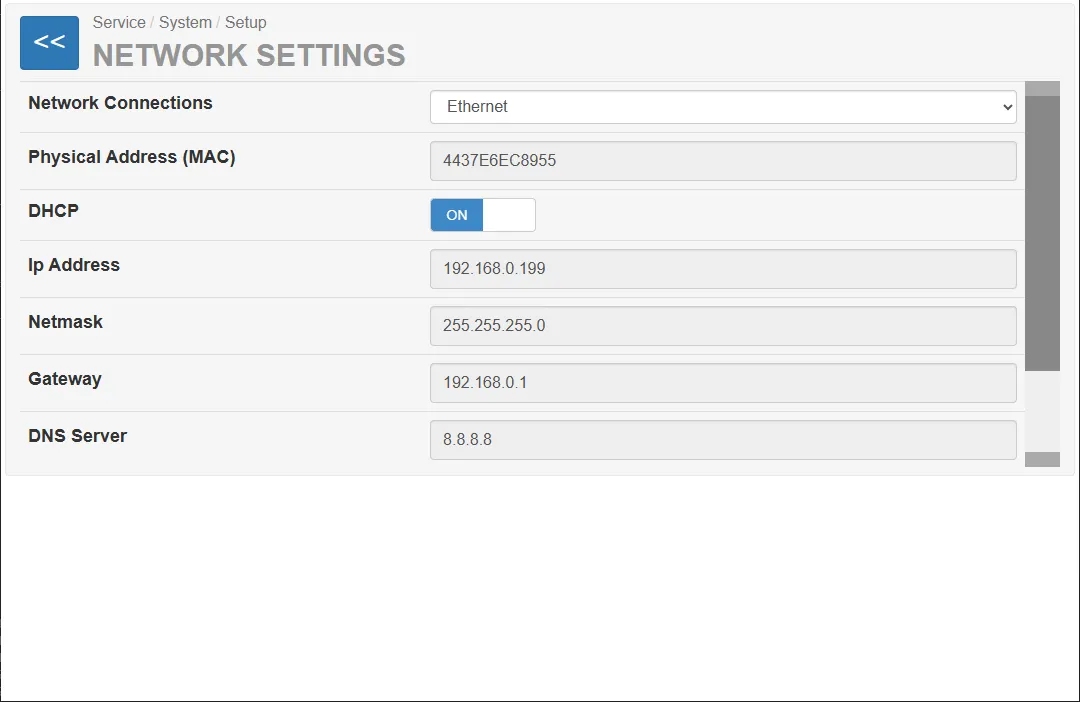
The interface allows configuration of:
- network interface type
- IP configuration
- DNS settings
- hostname
- DHCP configuration
Changes made on this page require a system restart to take effect.
Network Interface
Section titled “Network Interface”The field Network Connections allows selecting the active network interface used by the vending unit.
Depending on the hardware configuration, different network interfaces may be available (for example Ethernet or other network adapters).
MAC Address
Section titled “MAC Address”The Physical Address (MAC) field displays the hardware MAC address of the selected network interface.
The MAC address is a unique identifier assigned to the network interface and cannot be modified.
DHCP Configuration
Section titled “DHCP Configuration”The DHCP switch controls whether the IP configuration is obtained automatically.
DHCP ON
Section titled “DHCP ON”When DHCP is enabled:
- the network automatically assigns the IP address
- subnet mask, gateway, and DNS server are received from the network
This is the recommended configuration for most installations.
DHCP OFF
Section titled “DHCP OFF”When DHCP is disabled:
- all network parameters must be entered manually
- the machine uses a static IP configuration
Manual Network Configuration
Section titled “Manual Network Configuration”When DHCP is disabled, the following fields must be configured manually.
| Field | Description |
|---|---|
| IP-Adresse | IP address of the vending machine |
| Subnet mask | Subnet mask of the network |
| Gateway | Network gateway address |
| DNS-Server | DNS server used for name resolution |
Hostname
Section titled “Hostname”The Hostname field allows defining the network name of the vending machine.
This name may be used for identification within the local network or server infrastructure.
Saving Settings
Section titled “Saving Settings”To apply the new network configuration, press:
Save and Restart
After saving:
- the configuration is stored
- the vending machine automatically restarts
The restart is required for the network settings to become active.