Printer Test
The Printer Test page allows service technicians to verify the correct operation of the receipt printer installed in the vending machine.
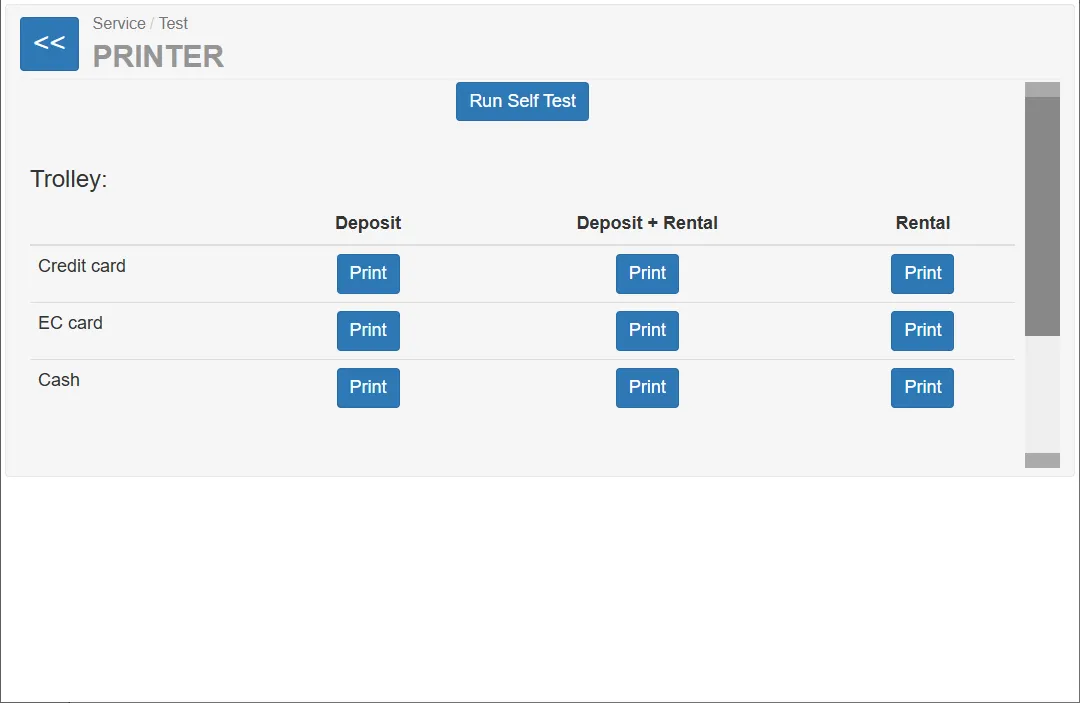
Using this page, the technician can:
- print sample receipts for different payment scenarios
- verify formatting and layout of receipts
- check printer hardware functionality
- test paper feed and printing quality
- verify event log printing
This page is mainly used during:
- installation
- service maintenance
- printer troubleshooting
- fiscal or receipt configuration testing
Printer Self-Test
Section titled “Printer Self-Test”Run Self-Test
Section titled “Run Self-Test”This button starts the internal printer self-test.
Function:
- prints a diagnostic test page generated by the printer itself
- verifies printer mechanics and basic functionality
Typical use:
- verify that the printer is connected and working
- check print quality
- confirm that paper feeding works correctly
Trolley Receipts
Section titled “Trolley Receipts”The Trolley section allows printing sample receipts for trolley rental transactions.
The table contains several scenarios depending on:
- payment method
- transaction type
Columns:
| Column | Meaning |
|---|---|
| Deposit | Receipt for deposit payment |
| Deposit + Rental | Receipt for deposit plus rental fee |
| Rental | Receipt for rental fee only |
Payment Methods
Section titled “Payment Methods”The following payment methods are available in the interface:
- Credit card
- EC card (debit card)
- Cash
Important
Section titled “Important”In the current system configuration, credit card and debit card payments produce identical receipts.
Therefore:
- Credit card
- EC card
both lead to the same printed result.
Credit Card
Section titled “Credit Card”Buttons in this row print receipts for card-based transactions.
Possible receipt types:
- Deposit
- Deposit + Rental
- Rental
These receipts simulate a trolley transaction paid with a bank card.
EC Card (Debit Card)
Section titled “EC Card (Debit Card)”These buttons also print receipts for card payments.
In the current system configuration:
- the printer output is identical to Credit Card receipts.
These buttons print receipts for cash payments.
Possible receipt types:
- Deposit
- Deposit + Rental
- Rental
These receipts simulate a trolley transaction paid with cash inserted into the machine.
Turnstile Receipts
Section titled “Turnstile Receipts”The Turnstile section contains buttons for printing receipts related to turnstile-based trolley release events.
Other Receipts
Section titled “Other Receipts”The Other section contains additional print functions.
Events
Section titled “Events”This button prints the event log of the machine.
Typical contents of the printed log:
- system events
- error messages
- operational events
- service activity
This function is useful for diagnostics and maintenance documentation.
Non-Relevant Functions in Current Configuration
Section titled “Non-Relevant Functions in Current Configuration”The following print options are visible in the interface but not used in the current system configuration:
- Money clearance
- Entrance fee
- Turnstile end receipt (Exit)
These functions exist in the software but are not relevant for the installed hardware configuration.
The only button from this section used in the current configuration is:
- Events